MSI AI QoS: The Next-Gen of Network Traffic Management
Networking
With the constant influx of new devices and applications, the competition for limited bandwidth has become fierce. While increasing available bandwidth is definitely a need in today’s digital landscape, effective network traffic management has also become more important than ever. That’s precisely what QoS features were designed for – ensuring stable and uninterrupted connected experiences even when nearing network/bandwidth capacity.
Let’s find out more about QoS and why it’s struggling before moving on to details about its successor.
What is QoS in networking?
If you’ve shopped for routers or explored your router’s admin page, you would’ve come across the term ‘QoS’ or Quality of Service.
So, what exactly is it?
QoS controls traffic prioritization in a way to ensure more important traffic can make it through on priority. For users, this should theoretically mean a stable and consistent networking experience for a variety of real-time applications.
For example, if a router is presented with the option of delivering a packet for a voice call or a web page, it should prioritize the real-time call traffic packets to ensure crystal-clear communication.
It’s important to note that QoS can only help when the bottleneck is at the router (or network access point).
Challenges of Current QoS Techniques
Although we’ve seen QoS features dramatically enhance the performance of real-time applications in the past, networking devices are starting to struggle due to strain of serving scores of devices even in a home setting.
Classification is Becoming More Difficult
In the past, while classification was challenging, techniques like marking and queuing could direct the flow of traffic. However, the rapid growth of both the types of devices and applications connected to a network has made this a challenging task. Traditional QoS features now have a hard time prioritizing the right kind of traffic.
Although some manufacturers have adopted ways to overcome this challenge using techniques like Deep Packet Inspection (DPI), they come with their own set of problems. Here, the router inspects every packet that goes through it – allowing it to (theoretically) read every single communication packet. But this level of scrutiny and invasiveness makes users uncomfortable due to privacy-related concerns.
Ideal QoS Configurations are Problematic
A ‘less-than-ideal’ QoS configuration can lead to high latencies, low speeds, and a terrible user experience overall. Configuring the feature properly does require a certain level of technical skill and knowledge that might be too much of an ask for the average user who just wants to browse the web without any fuss.
Another reason why configuring a traditional QoS is a challenging task is the multitude of applications available to end-users today. If you, say, configure your network for better video streaming performance, your gaming sessions might suffer. It’s almost impossible to find a one-size-fits-all QoS configuration that will effectively serve the average network today.
Introducing MSI AI QoS
MSI’s RadiX line of Gaming Routers come equipped with AI QoS, which improves on the original QoS feature. Not only does this ensure a stable and uninterrupted networking experience like the traditional QoS feature intended, but it also makes it easy to use for end-users!
The AI QoS feature grants you access to 4 broad modes –
- Gaming
- Streaming
- Work From Home
- AI Auto
- Gaming
- Streaming
- Work From Home
- AI Auto
As the names suggest, each mode has been trained to recognize its namesake network activity – allowing the router to actively optimize for it.

For example, if you’re using the Gaming mode, the router will identify the tiny packets of data that are characteristic of gaming activity over a network and mark them to ensure they’re delivered with minimal delay. In fact, we’ve seen up to a 90% reduction in ping when using Gaming model!
If you’re wondering, what AI Auto does. Well, again, as the name suggests, it switches into a sort of ‘balanced’ mode. This prioritizes traffic that the AI algorithm thinks is more important (more real-time/critical) than others – speeding up their transmission and delivery.
Let’s dive into how MSI’s AI QoS works then, shall we?
Traffic Classification and Marking
The AI model behind MSI’s AI QoS is trained on data flow behavior (using factors like packet size variance, bursts, distribution, etc.) to accurately predict traffic category. Once it identifies time-critical packets, they are classified and marked so the router can direct those packets to their destination without delay.
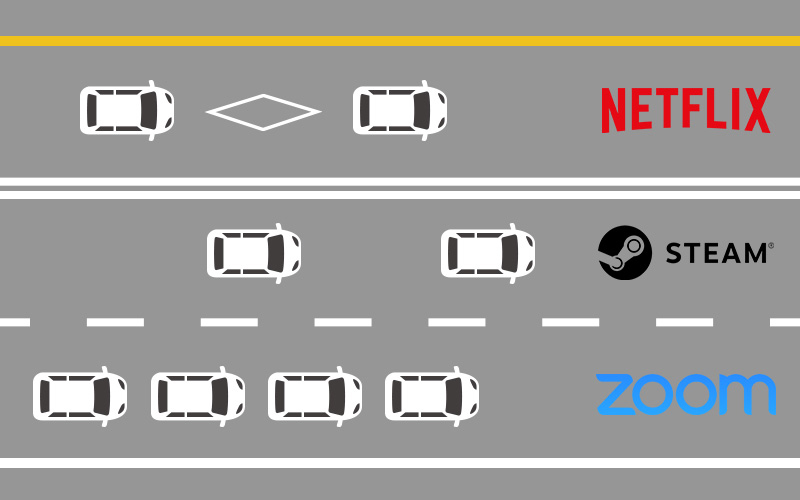
Although similar methods are used by techniques like Deep Packet Inspection (DPI) as well, it comes at the expense of privacy. AI QoS is not only faster than invasive techniques like DPI, but it also overcomes barriers that DPI cannot. For example, DPI techniques are unable to classify encrypted web traffic as its packets cannot be inspected. AI QoS, on the other hand, can classify encrypted traffic by analyzing the flow of data.
Dynamic Prioritization
The bandwidth available to a network can dramatically change optimal QoS conditions, and being flexible is paramount. By assessing network demands in real-time, the AI QoS algorithm can respond to fluctuations and tweak QoS settings on-the-fly – allowing for a far more seamless user experience.
This flexibility makes it an asset to home networks where you’ll generally find multiple users using a variety of different apps and devices.
Automatic Bandwidth Detection
Automatic Bandwidth Detection is designed to work in tandem with the Dynamic Prioritization Engine to balance and distribute bandwidth across all types of network traffic. It assesses the available bandwidth in real-time and balances the flow of traffic in a way that prevents network congestion.

AI QoS vs. Deep Packet Inspection
Although it might be invasive, Deep Packet Inspection (DPI) has stayed one of the most effective QoS techniques in the world. This technique involves inspecting every single packet (small unit of data) that moves through the router to identify applications and traffic type.
The accuracy DPI offers in identifying the purpose of a packet makes it nearly faultless. However, it comes with its own set of drawbacks.
For example, it cannot classify encrypted web traffic!
Since DPI needs to, well, ‘inspect’ each packet, and encrypted traffic is unreadable to anyone except the intended receiver, there’s not much that DPI can do.
That’s exactly why MSI’s AI QoS feature offers a significant edge over Deep Packet Inspection-based QoS. It relies on data flow and network behavior to detect applications and traffic types, rather than the data contained in a packet.
Let’s take a quick look at how they compare:
AI QoS
Deep Packet Inspection
Classify Encrypted Traffic
(SSL, HTTPS, etc.)
(SSL, HTTPS, etc.)
Yes
No
Collects data on you
No
Yes
Future and Current Compatibility
Limitless.
Predicts based on factors like data flow behavior
Predicts based on factors like data flow behavior
Limited.
Can only handle applications registered to its database
Can only handle applications registered to its database
CPU Usage
Lightweight
Heavy
Concluding
As the digital landscape morphs and evolves around us, traditional QoS techniques are struggling to maintain order in your networks. It has to both keep up with the high-bandwidth demands of modern internet connections (4K streaming, massive game downloads, etc.) as well as juggle a ton of devices on a network. MSI’s AI QoS uses an innovative AI model and algorithm to effectively manage a modern networking setup without breaking a sweat. It can reduce high latency in online multiplayer games, eliminate buffering when streaming, and grant you access to a way more seamless connected experience!
You can find out more details about the MSI’s entire RadiX Gaming Router lineup here.
Take a closer look of MSI networking solution:
MSI RadiX AXE6600 WiFi 6E Tri-Band Gaming Router
MSI RadiX AX6600 WiFi 6 Tri-Band Gaming Router
MSI AX1800 WiFi USB Adapter
Take a closer look of MSI networking solution:
MSI RadiX AXE6600 WiFi 6E Tri-Band Gaming Router
MSI RadiX AX6600 WiFi 6 Tri-Band Gaming Router
MSI AX1800 WiFi USB Adapter