How to Clean Your OLED Monitor?
Monitors
People generally clean or refresh electronic devices to extend their product life for long-term use. MSI already offers a 3-year burn-in warranty for OLED panels, but we want users to enjoy their monitors even longer. To help, we’ve created this guide on how to correctly clean an OLED monitor.

Dirt, Smudges, and Fingerprints Impact the Viewing Experience
Over time, your monitor may have dirt, smudges, and fingerprints, which can negatively affect your viewing experience, especially on HDR displays and true black displays.
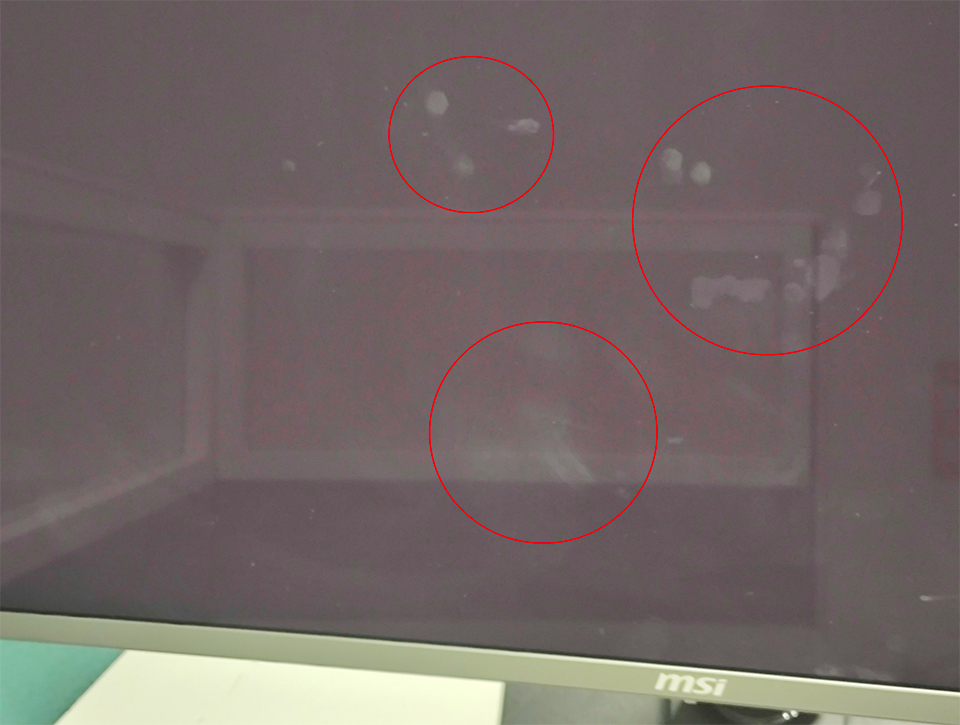
Dirt, Smudges, Fingerprints on OLED monitor
Using the Correct Cleaning Kit for Your OLED Screen
OLED monitors have a special material layer on the panel, so it’s important to use the proper cleaning kit to avoid scratching the screen. Here’s what we recommend:
- Three soft, high-quality microfiber or anti-dust cloths
- 70% ethanol solution as a solvent
- An ethanol wipe (optional)
The clean result of the solvent and cleaner cloth combination.
Cleaner Cloth
Solvent
Result
Microfiber
Ethanol (70%)
*****
Microfiber
Glass Cleaner
**
Microfiber
Oil Cleaner
*
Microfiber
Lenz wipes
*
Anti-dust
Ethanol (70%)
***
Anti-dust
Glass Cleaner
**
Anti-dust
Lenz wipes
*
Noted: ***** is the best effect, * is normal.
Follow these steps to clean your OLED screen:
- Disconnect the power cable from the monitor. Unplug the power cord to ensure safety.
- Remove external dust or foreign matter. Use a dry cloth to gently sweep away dust. Clean in one direction to reduce the risk of scratches.
- Remove fingerprints or oil stains with 70% ethanol. Do not spray the solvent directly on the screen. Instead, spray it onto the cloth, then clean the screen surface in one direction. Avoid using paper towels, as they can leave lint.
- Wait for the screen to dry completely. Avoid touching the screen while it dries to prevent new stains or fingerprints. Use a microfiber cloth to remove any remaining residue. Then enjoy your clean OLED monitor!
Noted: For the best results, always use a microfiber cloth.
Regular Maintenance
Now that you know how to clean your OLED monitor correctly, you can perform regular cleanings to extend its life. You don’t need to clean your monitor daily; weekly or monthly maintenance is sufficient.
Important: This tutorial is for MSI OLED monitor products only. Using unapproved cleaners or solvents could harm the panel. Additionally, improper cleaning may invalidate warranties in some cases, so follow these instructions carefully to avoid issues.
For more MSI monitor knowledge or tutorials, you can visit our Monitor Lab for the latest information.
Monitor Lab: Link
Monitor Lab: Link

MSI QD-OLED Monitor list
MEG 342C QD-OLED: https://www.msi.com/Monitor/MEG-342C-QD-OLED
MPG 491CQP QD-OLED: https://www.msi.com/Monitor/MPG-491CQP-QD-OLED
MPG 321URX QD-OLED: https://www.msi.com/Monitor/MPG-321URX-QD-OLED
MPG 271QRX QD-OLED: https://www.msi.com/Monitor/MPG-271QRX-QD-OLED
MAG 341CQP QD-OLED: https://www.msi.com/Monitor/MAG-341CQP-QD-OLED
MAG 321UPX QD-OLED: https://www.msi.com/Monitor/MAG-321UPX-QD-OLED
MAG 271QPX QD-OLED: https://www.msi.com/Monitor/MAG-271QPX-QD-OLED
MEG 342C QD-OLED: https://www.msi.com/Monitor/MEG-342C-QD-OLED
MPG 491CQP QD-OLED: https://www.msi.com/Monitor/MPG-491CQP-QD-OLED
MPG 321URX QD-OLED: https://www.msi.com/Monitor/MPG-321URX-QD-OLED
MPG 271QRX QD-OLED: https://www.msi.com/Monitor/MPG-271QRX-QD-OLED
MAG 341CQP QD-OLED: https://www.msi.com/Monitor/MAG-341CQP-QD-OLED
MAG 321UPX QD-OLED: https://www.msi.com/Monitor/MAG-321UPX-QD-OLED
MAG 271QPX QD-OLED: https://www.msi.com/Monitor/MAG-271QPX-QD-OLED