What Is the MUX Switch & What Can It Do For You?
Laptops
The MUX switch: a feature that more people should know about and know what it can do for them. So let’s get into it.
What Is Microsoft Hybrid Graphics?
On typical laptops, the video signal is output from integrated graphics which is inside the CPU. This is also applicable to those laptops with discrete graphics. If you launch some GPU-intensive apps like games or 3D rendering software, the GPU will process these tasks and send them back to integrated graphics for outputting the video to the display. This structure is also called Microsoft Hybrid Graphics or Optimus.
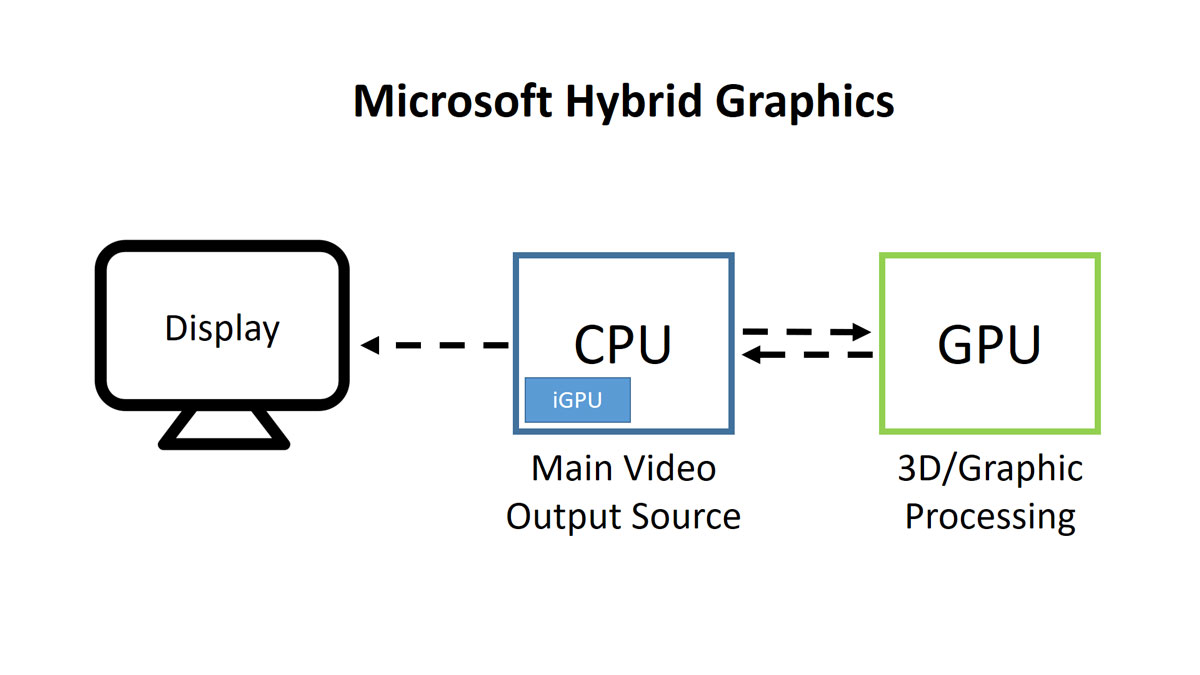
The biggest advantage of the structure is power saving because the laptop can just put the GPU to sleep mode while it’s not working. It can save a lot of power and it is expected to have longer battery life.
But everything comes with a cost. The back and forth of the data between CPU & GPU can cause higher system latency and it has been proved that game compatibility or performance under Microsoft Hybrid structure is not as good as discrete graphics mode, which allows GPU to output the video signal to display directly and that’s the reason why MUX switch was born.
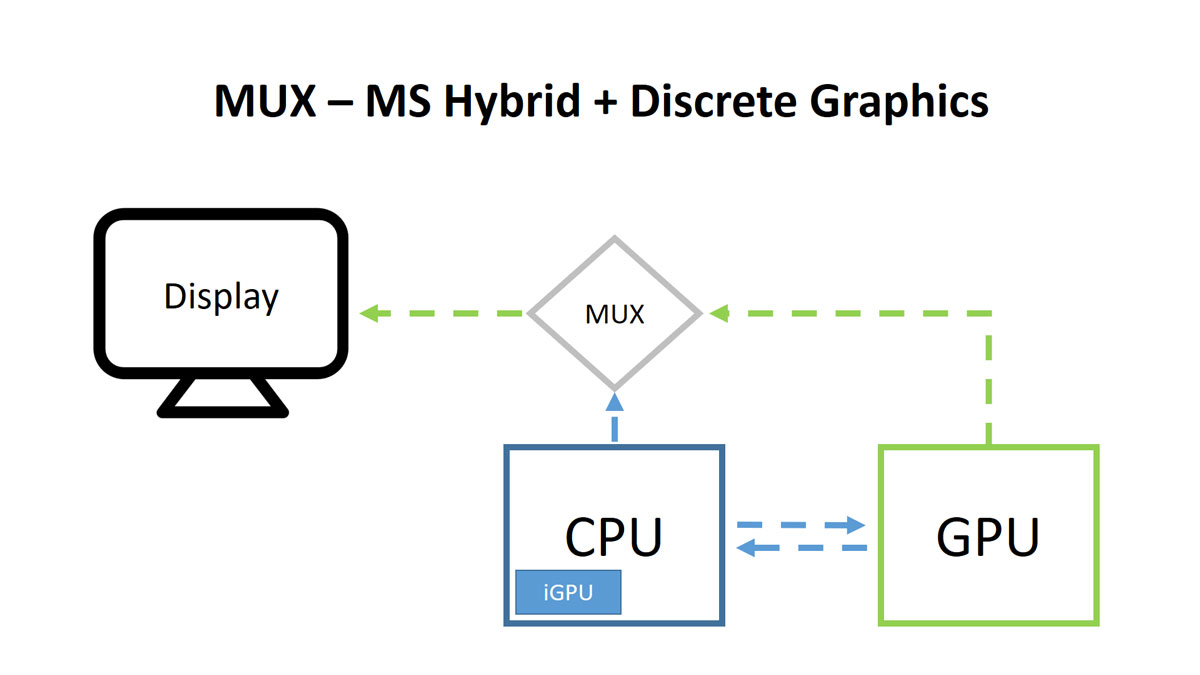
With MUX switch, you can freely switch between typical Microsoft Hybrid Graphics mode or discrete graphics mode; If you’re just doing basic tasks like documentation or web browsing, just switch to Microsoft Hybrid graphics mode for longer battery life; If you want to play games or perform some GPU-intensive softwar, just switch to discrete graphics mode for better performance and compatibility.
How To Use MUX On MSI Laptop
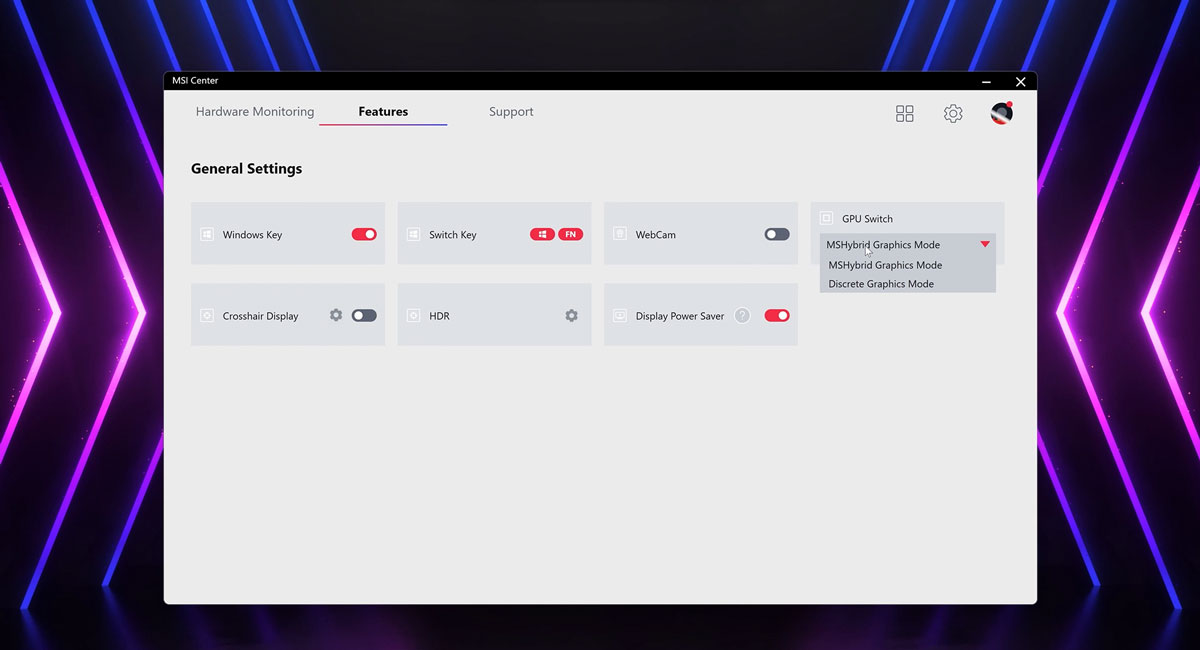
Now you know what MUX switch is and what it can do for you. Next, let’s see how it actually works on MSI laptops. Just launch MSI Center, go to the general setting and find GPU switch, where you can switch between Microsoft Hybrid Graphics mode or discrete graphics mode. Just select the mode you want and the system will ask you to reboot the laptop and that’s it. Quite easy isn’t it? Now you can embrace the convenience brought by the MUX switch.
Another Way to Switch To Discrete Graphics
There’s another way you can have the discrete graphic mode immediately. If the HDMI™ or the Type-C port on your laptop is connected with discrete graphics directly, just attach your external monitor with it and set it as your main screen. Then you can have additional performance under those GPU-intensive softwares right away.
MUX
GPU-Connected HDMI™ or Type C
Titan GT77/HX 13V
Yes
Yes
Raider GE (11/12th/13th Gen)
Yes
Yes
Vector GP (11/12th/13th Gen)
Yes
Yes
Stealth GS66/GS76/15 (11/12th/13th Gen)
Yes
Yes
Pulse 17 B13V
Yes
Yes
Katana 15/17 B13V
Yes
Yes
Here is a table that shows the list of MSI laptop models that support MUX switch or GPU-connected HDMI™ or Type-C port for your reference.


