Revive Your Old PC Internet Speed with MSI AXE5400 Wi-Fi 6E USB Adapter
Networking
Introduction
Wi-Fi 6E opens the door to the 6 GHz frequency band, providing a seamless pathway for your data without the encumbrance of accommodating older 2.4 GHz and 5 GHz devices.
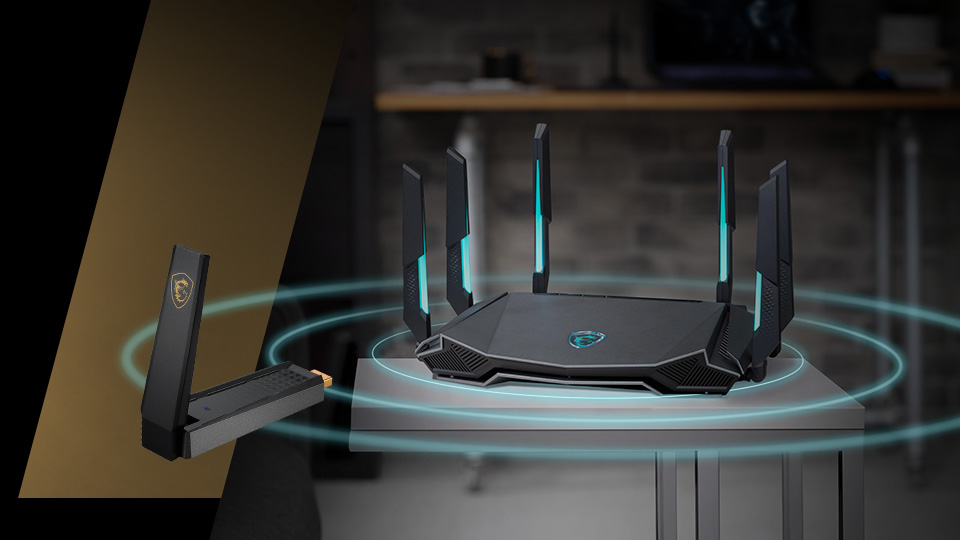
Upgrading to Wi-Fi 6E for your router and home network is a straightforward process. Simply opt for a router such as MSI’s RadiX AXE6600 gaming router, and your modern Wi-Fi 6E network is good to go!
However, the dilemma arises with your existing devices—perhaps an old laptop, a non-Wi-Fi-enabled desktop, or one that doesn't support the latest Wi-Fi standards.
Replacing all of them might seem impractical and too costly.
The reassuring news is that not every device in your home necessitates access to the newest wireless standard. Devices used for bandwidth-intensive applications like 4K/8K streaming, AR/VR, or large downloads would benefit from cruising along the 6 GHz band as swiftly as possible.
What is a Wi-Fi USB Dongle (Adapter)?
That’s precisely where the nifty Wi-Fi USB dongle or USB Adapter can come in handy. Not only does it allow any old laptop/desktop to access new wireless standards, but it’s also relatively inexpensive when compared to the scale of upgrading your device.
So, what exactly is a Wi-Fi ‘dongle’/adapter?
Simply put, it's a small device that plugs into a USB port of a laptop/desktop PC to grant it access to wireless networks.
Of course, you can buy super basic Wi-Fi adapters that’ll allow you to connect to Wi-Fi, but they usually only support older standards. If you want to enjoy the latest technologies that newer wireless standards have to offer, even on older devices, you have to pick carefully.
The MSI AXE5400 Wi-Fi 6E USB Adapter is one such option.
With it, even old devices can enjoy the full potential of Wi-Fi 6E’s capabilities – including access to that 6 GHz frequency band.
Advantages of the MSI AXE5400 Wi-Fi USB Adapter
While upgrading your devices to get native support for Wi-Fi 6E is an option, it doesn’t make too much sense if that’s the ONLY reason you’re upgrading. Of course, if you’re upgrading for better performance and features, it’s another story.
A Wi-Fi Adapter is the best option for older laptops/desktops that need access to Wi-Fi 6E’s superior reliability and speeds. What’s more, it saves you from being forced to upgrade your entire setup.
Easy Setup
As long as you have access to a PC/Laptop that can run Windows 10 or 11, the AXE5400 Wi-Fi USB adapter offers a straightforward, plug-and-play setup process. The driver is built right into Windows, and you don’t have to go through a complicated setup to get up and running.
Note: Due to OS-level limitations, you need Windows 11 to connect to 6 GHz Wi-Fi networks.
Flexible
In addition to boasting an easy setup, the MSI AXE5400 Wi-Fi USB Adapter is relatively compact with its size making it easy to carry around or even leave plugged into your desktop.
Upgrading a PC/laptop with newer Wi-Fi 6E capable hardware allows it to enjoy access to Wi-Fi 6E networks and features. However, a dongle like the MSI AXE5400 grants you far more flexibility. You can swap it across devices depending on where you need it the most at any time!
That said, if you need several devices to stay on 6 GHz simultaneously, you’ll also need multiple adapters.

Superior Performance
When you plug the MSI AXE5400 USB Wi-Fi Adapter into any Windows PC, you’re supercharging its wireless capabilities. It instantly gains access to a modern wireless standard and can enjoy all its benefits.
Tri-Band Support
Thanks to the addition of the 6 GHz band to Wi-Fi 6E, your devices can now communicate across the 2.4 GHz or 5 GHz band and the new 6 GHz band. Pick and choose based on your specific requirements.
The 6 GHz frequency band is ideal for bandwidth-intensive applications like real-time AR/VR, high-resolution video conferences, streaming, and more. It’s also great for latency-sensitive applications like online gaming, where even a single delay or dropped packet is unacceptable.

Foldable External Antenna
Although you can enjoy a decent wireless experience without an antenna, having one enhances wireless capabilities to the next level. The MSI AXE5400 Wi-Fi USB Adapter features a foldable antenna that you can open up when you need the best speeds and most reliable connectivity.
Although ‘nano’ USB Wi-Fi adapters are a thing, and are more compact, they’re usually plagued by connectivity issues. The foldable antenna allows you to enjoy a decent middle ground between performance and portability.
Enhanced Security
All Wi-Fi 6E devices on 6 GHz are now required to use WPA3 encryption for the best available security for your network. With the Wi-Fi 6E adapter, you can enjoy this elevated level of protection without any compromises!

USB 3.2 Gen 1 Support
The MSI AXE5400 Wi-Fi USB Adapter features support for USB 3.2 Gen 1 with speeds of up to 5 Gbps ensuring that it will never bottleneck your internet connection (as long as you have a modern USB port on hand). You’ll be able to handle even the most bandwidth-intensive tasks without breaking a sweat.
Who Should Consider the MSI AXE5400 Wi-Fi USB Adapter?
Honestly, a Wi-Fi 6E adapter like this one is so flexible that you could argue for nearly everyone owning one. Nonetheless, a few use cases will benefit more than others.
Legacy Wi-Fi Laptops
If you have older laptops that frequently disconnect from your network, or even refuse to connect at times, a Wi-Fi 6E adapter can breathe new life into them. They’ll gain all the features of Wi-Fi 6E and enjoy all its benefits, like enhanced reliability, speed, and security.

Wired Desktops without Wi-Fi
Older desktops with motherboards that don’t have Wi-Fi force you to run ugly cables all across your rooms. A Wi-Fi 6E adapter like the MSI AXE5400 gives you a superior, wire-free experience that rivals even the most modern, high-end setups at a fraction of the cost.

Modern Desktops on Older Wireless Standards
Even last-gen Wi-Fi might not be good enough to keep up with your demands if you’re gaming, streaming, and handling high-resolution video conferences. The AXE5400 Wi-Fi 6E adapter might be worth considering for those still plagued by connectivity issues.
Just make sure that your issues are caused by overcrowding of your network and/or interference from the scores of other devices on legacy frequency bands like 2.4 GHz.
Upgrading to Wi-Fi 6E, Pain-Free
Once your Wi-Fi 6E network is up and running, take a closer look at the devices in your home and identify those that will benefit the most from accessing Wi-Fi 6E-specific features like 6 GHz.
You know, any devices where you’ll be gaming, streaming, or using real-time AR/VR applications are fair game to be elevated to Wi-Fi 6E. Keeping these high-bandwidth applications off your legacy 2.4 GHz and 5 GHz frequency bands will also improve the connectivity and reliability of your other legacy devices that still operate on those bands.
The MSI AXE5400 Wi-Fi 6E USB Adapter stands out as a cost-effective solution for enhancing device connectivity. It gives you an easy upgrade path for older devices and allows you to modernize your network without extensive investment. Just plug it in, and immediately enjoy all the improvements and features of a modern Wi-Fi network!
Discover the full specifics of the AXE5400 USB Adapter on its product page here!